
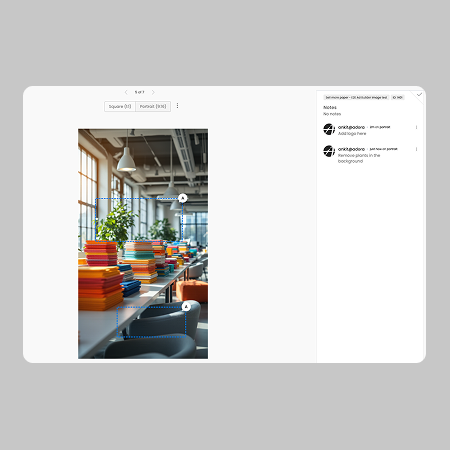
Regional Commenting

We've released two new features within our review ads workflow that we hope make providing feedback and collaborating much easier.

Adora Product Team
August 15, 2025

Regional commenting

Pin feedback exactly where it matters. Adora now lets you add comments directly to specific regions of any image, creating threaded discussions that track changes needed to precise parts of your creative so nothing gets lost in translation.

  • Comment Placement - Click any location on the canvas to pin a comment, or click and drag to select a region for broader feedback. Your comment attaches directly to that spot on the image.
  • Threaded Collaboration - Team members can respond to comments creating organized discussion threads tied to specific image areas. Edit comments as needed and mark them as resolved once changes are complete.

To add a comment:

  1. Select a location on any image to comment on by clicking the spot on the canvas or dragging to select a region.
  2. Type your message in the field.
  3. Click add comment to send your message.

Rejected Ad Notification

When a user rejects an ad, the comment box will now show who rejected the image and at what time.

Subscribe to our Newsletter